
Freight Broker Software and TMS Pricing Models Explained
Article brief:
Freight broker software pricing can be per user, per load, per shipment volume, flat subscription, or custom enterprise agreement.
The quoted software price might not cover implementation, data migration, EDI work, training, or add-on modules.
Free TMS software might work for simple operations, but limitations often creep in as volume, integration, or reporting needs grow.
For a brokerage, the real cost of software is in how it affects labor, pricing accuracy, and margin.
Freight broker software and TMS pricing models differ because they do different things at their core, and vendors charge accordingly, though the model ultimately depends on the vendor. For instance, some price per user while others charge per load, shipment volume, annual subscription, or negotiated enterprise contract. The harder part is translating those numbers into your real-world operation once the software is live.
A low subscription can still be costly if the base price doesn't include integrations, support, training, or manual work. But if the system eliminates enough repetitive work or helps the team to make better pricing decisions, a higher software bill can be justified. That is why TMS pricing should be treated as an operating-cost issue, not just a software invoice.
Freight broker software pricing models usually follow a few common structures
Freight broker software is commonly sold through a small set of pricing models, though in some cases, vendors try to combine them.
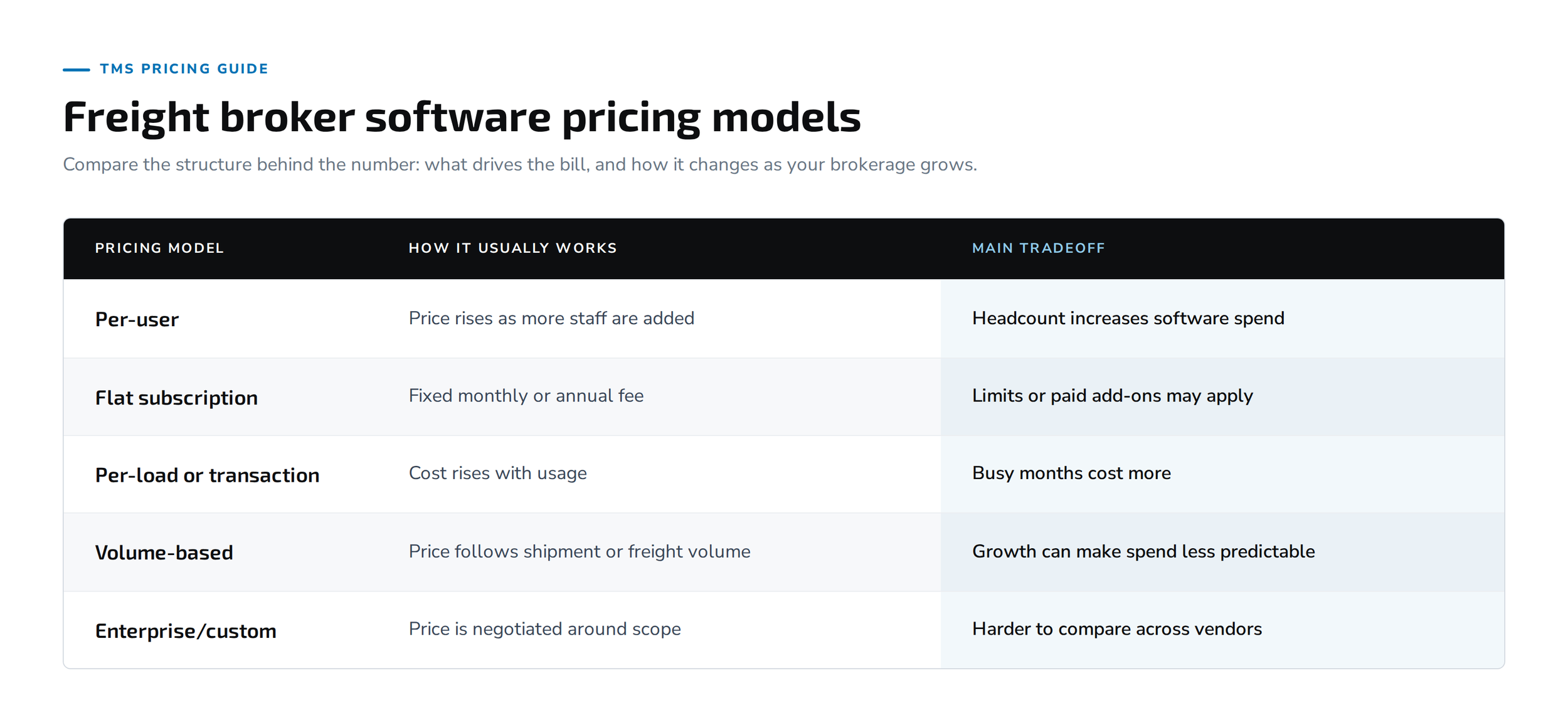
A vendor may charge a base annual subscription and then add fees for advanced reporting, integrations, or support. Another might price on shipment volume, and include more of the stack in one contract. Either way, the buyer must compare the structure behind the number, rather than getting stuck on the numbers themselves.
Freight brokers should understand what causes the bill to grow
The variables that drive the price are another critical aspect of the pricing model freight brokers must consider. If a system charges per user, then as the brokerage adds people, the software cost will naturally go up. But if it is charging by the load, spending grows with freight volume, even if headcount is flat. Volume-based models can work for some teams, but may be harder to predict during seasonal peaks.
The right model depends on how the brokerage will grow. Adding more carrier sales reps can make you feel the effect of per-user pricing quickly. On the flip side, a brokerage that maintains steady staffing levels but moves more freight through that same team may feel the effects of transaction pricing more.
Before signing, model a normal month, a heavy month, and what the business looks like 1 year out. That simple exercise typically tells you more about the real cost than the starting price.
Free TMS software can work until the limits matter
Free TMS software isn't automatically a bad choice. For a small brokerage with low shipping volumes, simple load management, and few integrations, a free TMS might be fine. That can be plenty for an early-stage operation that wants to avoid unnecessary overhead.
The issue comes when the business grows around the edges. Those limits could be user counts, load volume, reporting, integration access, automation, or support. A team may find itself building manual processes around the missing pieces, and the “free” system ends up taking more staff time to run. Not every brokerage needs an enterprise platform, but just make sure to measure software cost against the work the system leaves behind.
Load management pricing can make growth more expensive
Load management pricing is a special case, since transaction-based models can shift quickly as volume increases. Say a brokerage does 2,000 loads a month and is paid per transaction. If the volume increases to 3,000 loads, the software spend increases even if the same staff is doing the work.
If the platform can support the additional freight without increasing headcount, that’s still a good trade. But the buyer needs to understand how the math changes before peak season. You want to ask key questions like: Are all loads the same? Are different freight modes priced differently? Also ask about canceled loads, test loads, or duplicate entries included in usage.
Small details can change the bill. What looks like a predictable pricing model at current volume can feel very different as the operation scales.
Document management and electronic data interchange can add cost
Document management and electronic data interchange are other areas where costs can vary by vendor and installation. Some platforms do provide these capabilities in the base plan. Some charge for EDI integrations, API work, custom reports, document storage, connecting the TMS to external tools or software, or other professional services.
But it doesn't really matter whether or not a TMS “supports EDI.” Focus more on what is included, what setup work is needed, and what happens when a new customer or carrier needs a connection down the road. Some platforms also charge onboarding fees for carriers or shippers. The same goes for accounting tools, load boards, and shipment tracking services. A base subscription without the connections your team makes each day may not stay cheap for long.
If integrations are a major part of the evaluation, check out our TMS integrations for freight brokers page for more detail.
Freight brokerage software has costs before the first load
Freight brokerage software can generate front-loaded costs before the operation moves a single live load. This total cost of ownership may include data migration, implementation, configuration, staff training, custom integrations, and professional services.
Implementation and customization fees can vary widely based on system complexity.
The exact structure depends on the vendor, but you should factor these costs and other additional costs into the overall comparison. For example, if the setup work is heavy, a system with a low annual subscription might cost more in year 1 than you expect. Or the agreement may include more implementation support.
Support costs are also high. Some vendors offer continuing assistance. For others, more advanced training or higher support tiers might cost something. The point here is that hidden costs can materially change the total cost of ownership.
Cloud TMS and licensed systems spread costs differently
Cloud-based TMS reduces the need for internal IT infrastructure compared with server-based software. This means upfront and maintenance costs are spread across an ongoing subscription rather than a large upfront license fee. You can budget better and pay only a fraction of the cost over time, while the vendor handles upgrades, hosting, and access, often including automatic updates, access from any location with internet, easier scaling with business growth, and less need for in-house IT support. SaaS TMS deployments may be structured as single-tenant or multi-tenant systems.
Licensed or on-premises models require installation on company servers and can cost roughly $50,000 to $400,000 upfront, whether deployed on a provider's servers or on your own network. In addition, licensed/on-Premises models often have expenses for maintenance, support, and/or personnel, and licensed systems often carry annual maintenance fees of 15-20% of license costs. Don't evaluate either model based on how you pay for it. The most important thing is the overall Cost of Ownership (COO) and how well the system functions within the brokerage operations.
Lane pricing changes the economics of a broker TMS
A brokerage is losing money on a lane because it's priced $75 less than it should be. If it wins 100 loads as a result, the loss from that pricing mistake is $7,500, before any execution adjustments that affect those 100 loads. A broker TMS can affect the pre-coverage pricing decision while also managing your loads.
So the next question to answer would be if pricing intelligence has been integrated into your workflow (baked-in), if Pricing Intelligence was going to be sold as a separate product (sold-separate), or if pricing intelligence did not exist for you (missing). If your pricing tool existed in another system, your team had to switch between systems before entering load information. When pricing is embedded in the workflow, automated rate calculations can cut quote turnaround to minutes and pull in current carrier rates. For brokers in volatile lanes, losing money because the price was wrong could cost more than the software.
Broker TMS pricing should be compared with operating outcomes
Compare a broker TMS with the work and financial results it changes. Look at spend on software, implementation and migration costs, integration costs, manual work remaining, pricing accuracy, loads per employee, and margin impact, and note that strong automation can cut data entry time by as much as 80% in documented cases. That kind of lift supports operational efficiency, faster replies, and better customer satisfaction. This is especially important when comparing a lower-cost TMS with a system that includes pricing intelligence, because real-time data helps teams make informed decisions.
At Transfix, our customers are seeing 1.5 to 3 points of margin improvement, and our rate generation is 97% to 98% equivalent to the market. We also see a 20% to 30% improvement in rate accuracy in documented customer results. That doesn’t make subscription price irrelevant, but it shows brokers are getting their money's worth.
Management software pricing questions to ask before signing
Before buying freight management software, ask:
Is pricing per user, load, transaction, volume or flat subscription?
How does pricing change as load volume grows?
Which integrations are included?
Are EDI or API connections extra?
What does implementation include?
Is data migration included?
Is staff training included?
What support is included in the base price?
Which modules cost extra?
Are there contract minimums?
What manual work will still exist after implementation?
These questions help expose the difference between a low headline price and a low operating cost.
How Transfix pricing gets you more, not less
At Transfix, we measure broker software by the decisions it changes. It is why we embed pricing intelligence into the brokerage workflow with Custom Cost Models trained on each customer's own freight. This way, pricing drives load coverage, customer wins, and margin. Schedule a demo today with us to get started.
Frequently Asked Questions
Q1. How much does freight broker software cost?
There is no single market price for a freight broker platform because buyers are often really comparing broader transportation management software or a transportation management system, and vendors use different models. Cost may depend on users, loads, shipment volume, integrations, implementation, data migration, training, and support. Buyers should compare the full operating cost rather than the base subscription alone.
Q2. Is free TMS software enough for a freight brokerage?
It can be for a small operation with simple workflows and limited volume, though free TMS software often has limited capabilities compared with paid versions and may be best for very simple logistics operations only. The fit usually changes when the brokerage needs more users, better reporting, deeper integrations, or more automation.
Q3. Which TMS pricing model is best for a growing freight brokerage?
That depends on how the brokerage grows. Per-user pricing rises with headcount, while per-load or volume pricing rises with freight activity. A flat subscription may offer more predictability if the included limits fit the operation.
Q4. How should a brokerage compare Transfix pricing with a cheaper TMS?
Compare the subscription and implementation cost with the broader operating impact. That includes manual work, pricing accuracy, workflow coverage, and expected margin effect. For Transfix, the relevant proof points include 20% to 30% improvement in rate accuracy and 1.5 to 3 points of margin improvement.
