
Article brief:
Freight broker software should match a brokerage's workload instead of just accommodating users or employee counts.
Small teams don’t need a heavy implementation. In fact, what they often need is a combination of simple load management, load boards, tracking, carrier vetting, and billing.
Mid-market freight brokers, on the other hand, generally require more carrier management, price controls, integrations, exception tracking, and less manual data entry.
The cost of freight broker software should include the labor of moving information between systems, chasing status updates, and checking carriers.
A five-person brokerage or a 50-person brokerage may need freight broker software, but basing the decision on team size alone misses the bigger issue. A better approach would be to buy based on what happens to each load. For example, how many people touch it and how many systems hold its data? The brokerage should also factor in how often someone types information twice and how much judgment the team has to apply before the load closes.
For a small team moving fairly simple freight, a lighter transportation management system (TMS) might do the trick. However, as load volume, carrier relationships, RFPs, and pricing decisions multiply, the software starts doing much more of the operating work. That's the real difference between small- and mid-market freight broker software. You must be able to gauge how much complexity the system can absorb without the brokerage having to add manual labor.
What Freight Broker Software Actually Needs To Do
Ideally, whether your brokerage is small or mid-market, you want your freight broker software to manage a load efficiently from creation to payment while keeping everyone on the same page. At a basic level, that should at least cover load creation, carrier sourcing, carrier management, shipment tracking, documents, and billing. Depending on operations, a broker might also need pricing data, customer history, reporting, accounting links, and access to load boards.
This difference is clear on a typical load. A rep enters the shipment once, and the system can then use that load record for carrier sourcing, rate confirmation, shipment status, proof of delivery, and invoicing. If the rep has to enter the same pickup address or rate in three other tools, the brokerage still has a software problem that may be manageable with 30 loads but quickly becomes a nightmare with 300 loads.
What Small Freight Brokers Need From Broker Software
Small freight brokers need software that can automate routine work without racking up huge bills or requiring a complicated setup. For many small teams, a good starting point is: generate a load, create or search for capacity, qualify a carrier, send a rate confirmation, track the shipment, archive documents, and invoice the customer. The interface matters too because, for instance, a three-person brokerage probably doesn’t have someone whose job is to administer a TMS.
So, a small brokerage should pay close attention to:
Simple load creation and load management
Direct connections to the load boards it already uses
Carrier vetting during booking
Rate confirmations and document storage
Shipment tracking and useful status updates
Customer invoicing
Accounting connections
A clear view of the current load without jumping through several screens
Low load volume can make some manual work tolerable, but tolerance has limits. If a rep spends the morning copying data between the TMS, QuickBooks, email, and a tracking portal, then the cheap software starts consuming more paid hours than intended. That is a real cost.
What Mid-Market Freight Brokerages Need From Freight Broker TMS Software
Mid-market freight brokerages need a freight broker TMS software platform that can handle higher load volume without turning growth into a headcount exercise. The work itself may change as a brokerage grows because it needs to qualify more carriers, monitor more loads, make more pricing decisions, and have more people touch the same shipment. In that case, factors like historical lane data become more useful, and small handoffs done through email can suddenly become points of failure.
The difference looks roughly like this:
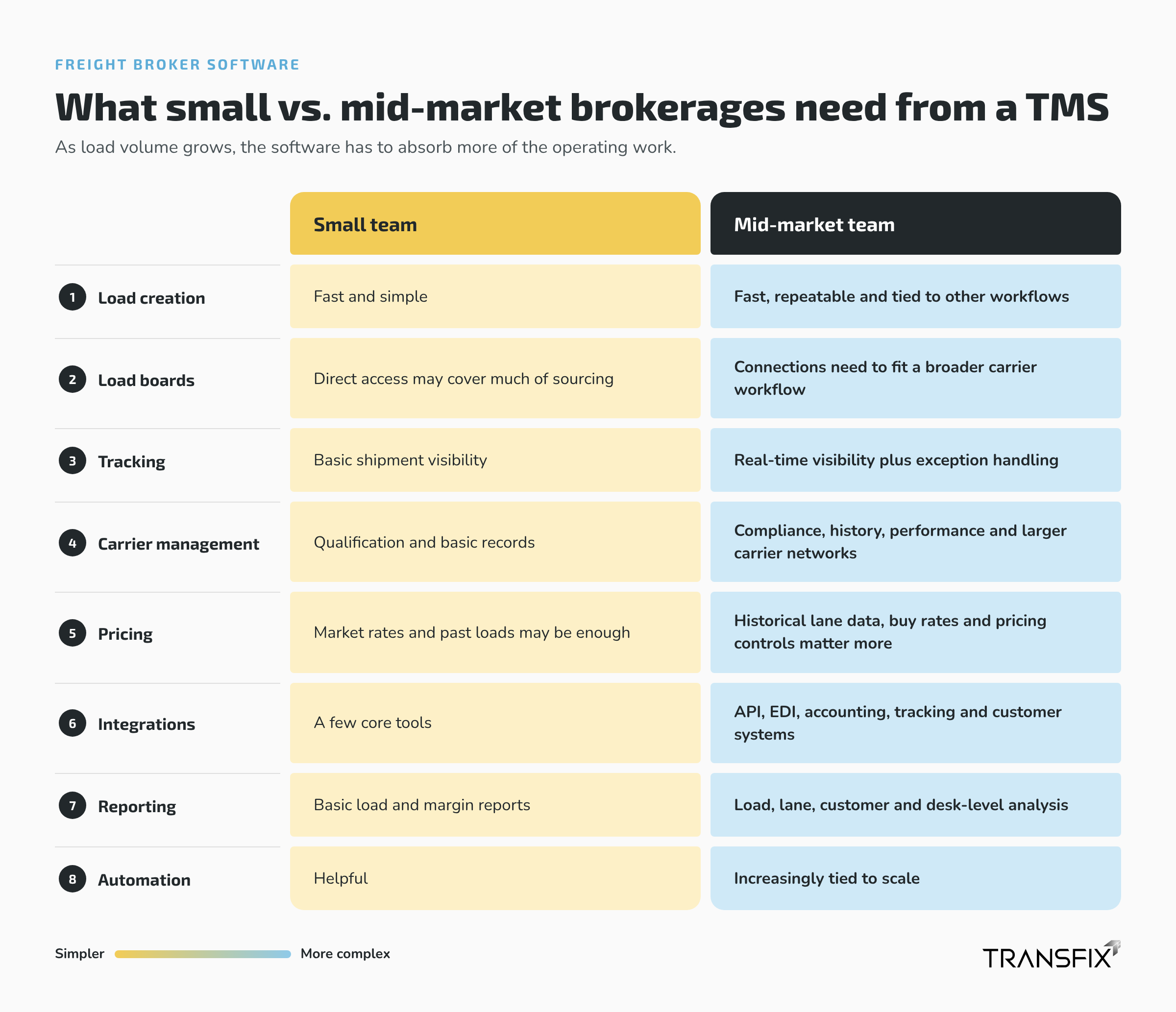
Carrier Management and Carrier Vetting Gets Harder as Volume Grows
Keep compliance information close to the booking decision because carrier status can affect whether a load can be covered at all by that specific carrier. According to the FMCSA, for-hire carriers need the required proof of insurance to maintain active authority. Its safety systems also offer authority and insurance information brokers can use when checking a carrier, and those details are available on the agency’s own site.
Ideally, the rep should have easy access to that information for verification while they’re working the load, whether through a freight broker TMS or a connected carrier vetting tool, because pulling compliance into one system removes manual re-entry and repeated lookups across disconnected tools. It beats the rep having to switch screens or applications, or even open another site just to search for the MC number or look up a certificate, then go back to booking. Continuous monitoring can also catch changing insurance, safety, compliance, or fraud risk after onboarding, though it matters less with a very small, stable carrier base.
Real-Time Tracking Should Reduce Check Calls
Real-time tracking is most useful when the operations team's next action depends on shipment visibility. A check call is a manual call to a driver for location and status, while tracking connected through telematics or ELD providers can feed shipment status and GPS-based location updates directly into the load record inside a transportation management system. The goal is to give the brokerage and its clients a real-time view without having to call every few hours to check.
Midmarket operations could also add another layer of support through exception management. For example, the system could alert you if shipments missed scheduled pickups, had unexpected stops, or were going to be late, since staff can't check every piece of equipment, and shared visibility matters because everyone working the load sees the same shipment status. That can save time by reducing manual follow-up and other time consuming tasks when teams are handling more freight. With Transfix, you have a platform that integrates execution, check calls, and real-time shipment visibility within the same TMS workflow for quoting, carrier coverage, invoicing, and reporting.
Document Management Should Follow The Load Record
The best approach to document management is to keep each file attached to the load it belongs to. And if you think about it, when a team gets used to working out of inboxes, shared drives, and multiple disconnected systems, documents like rate confirmations, carrier records, PODs, and customer invoices can be surprisingly hard to find. At low volume, the problem may be a minor annoyance, but at mid-market scale, it can disrupt invoicing and billing workflows, causing operations and accounting tools to work from inconsistent information.
A good broker TMS keeps documentation adjacent to each load record, minimizing manual entry from shipment through payment in one screen. The same is true with integrations: in a single platform, EDI and API connections remove manual re-entry between load boards, accounting tools, customer systems, and tracking providers. For brokers, a good TMS can reduce data entry time by about 80%.
Where Transfix Fits For Growing Freight Brokers
Transfix works perfectly for freight brokerages that need a modern TMS on a single platform rather than cheap point tools, especially if they have enough historical freight data and operating volume to benefit from pricing intelligence across the full load lifecycle. The platform's Custom Cost Models leverage each broker’s freight history without training on other brokers' models, and pricing lives in the same workflow used for RFPs, carrier coverage, and execution.
Transfix customers achieve 50%-60% win rates, pricing on par with the market at 97%-98%, and a 1.5-3 point margin improvement. With Transfix, you can also price contract lanes in 3 to 7 seconds.
If you are a small brokerage that just needs cheap load posting, simple tracking, and simple billing, you may not need that depth just yet. The better signal is operational pressure. Most brokerages are better served by freight broker software than patching together more disconnected tools as they grow, especially once a small team starts adding people just to copy data, chase check calls, price more lanes, or manage growing carrier records. Schedule a demo today to get started.
Frequently Asked Questions
What is the best freight broker software for a small brokerage?
The best freight broker software for a small brokerage supports your actual load workflow without adding unnecessary cost or admin. At minimum, most brokerages should look for a TMS built for freight brokers that covers load matching, load management, load board connections, carrier vetting, tracking, documents, and billing in one system. Growth plans matter too. Software that works at 40 loads a month may become painful at 400.
How much does freight broker software cost?
Freight broker software costs vary by product, seat count, load volume, and included features. Load boards and broker TMS platforms usually follow different pricing models, so compare like with like. Load board subscriptions use their own pricing models, so buyers should confirm that they are comparing the same type of software.
When should a small freight brokerage move to a more advanced broker TMS?
A small freight brokerage should consider a more advanced broker TMS when rising load volume starts creating repetitive work through manual re-entry across systems. Common signs include duplicate data entry, frequent check calls, disconnected carrier vetting, delayed billing, scattered documents, the need for carrier portals and customer portals, and the need to add staff just to keep existing processes running, while an integrated TMS can move a covered load off the board automatically once booked instead of requiring duplicate updates.
Is Transfix suitable for a small freight broker?
Transfix can fit a smaller team when that brokerage has enough historical freight data, spot or RFP volume, and operating complexity to use its pricing and workflow capabilities. A new or very small brokerage that mainly needs basic load-board access and simple load management may prefer a lighter broker TMS, including tools with a free tier, before moving up. Transfix becomes more relevant when the brokerage needs pricing, carrier coverage, execution, invoicing, and reporting connected in one screen on a single platform.
